
By John Gruber
-Dark.png)
Mux — Video API
for developers.
Build better video.
AppleScript: ‘Save MarsEdit Document to Text File’
Thursday, 19 March 2026
Here’s a simple AppleScript I wrote this week — one that solves a minor itch I’ve had for, jeez, 20 years. Almost every item I post to Daring Fireball goes through MarsEdit, the excellent Mac blogging client from Red Sweater Software (my friend Daniel Jalkut). MarsEdit has a built-in “local drafts” feature, where you can save unpublished drafts within a library in MarsEdit itself. It doesn’t happen often but I occasionally wind up with partially written posts that I don’t publish, but don’t want to throw away. But I don’t really want to keep them in MarsEdit. I want them saved as text files. For me, those text files go in a folder in Dropbox. For someone else, maybe they go in iCloud Drive.
I write my longer posts in BBEdit, and then copy them into a MarsEdit document when they’re ready to publish. My shorter posts — which is most of them — are usually entirely composed in MarsEdit. Any abandoned drafts that I might return to, I probably want to compose in BBEdit, because the reason they’re abandoned is that they need to be longer. Or they need to be shorter. But either way they need more thought, and BBEdit is where I go to do my most concentrated thinking.
MarsEdit doesn’t have a built-in way to save a document window as a text file. Just its built-in “Save as Local Draft” feature. I didn’t merely suspect but knew that it’d be relatively easy to write an AppleScript to add a “Save as Text File…” feature to MarsEdit, which I could invoke within MarsEdit from FastScripts, the system-wide scripts menu utility that is also from Red Sweater/Jalkut, and, using FastScripts, I could even give the script the standard keyboard shortcut Option-Command-S. (Or is it Command-Option-S?)
It’ll take a window like this:
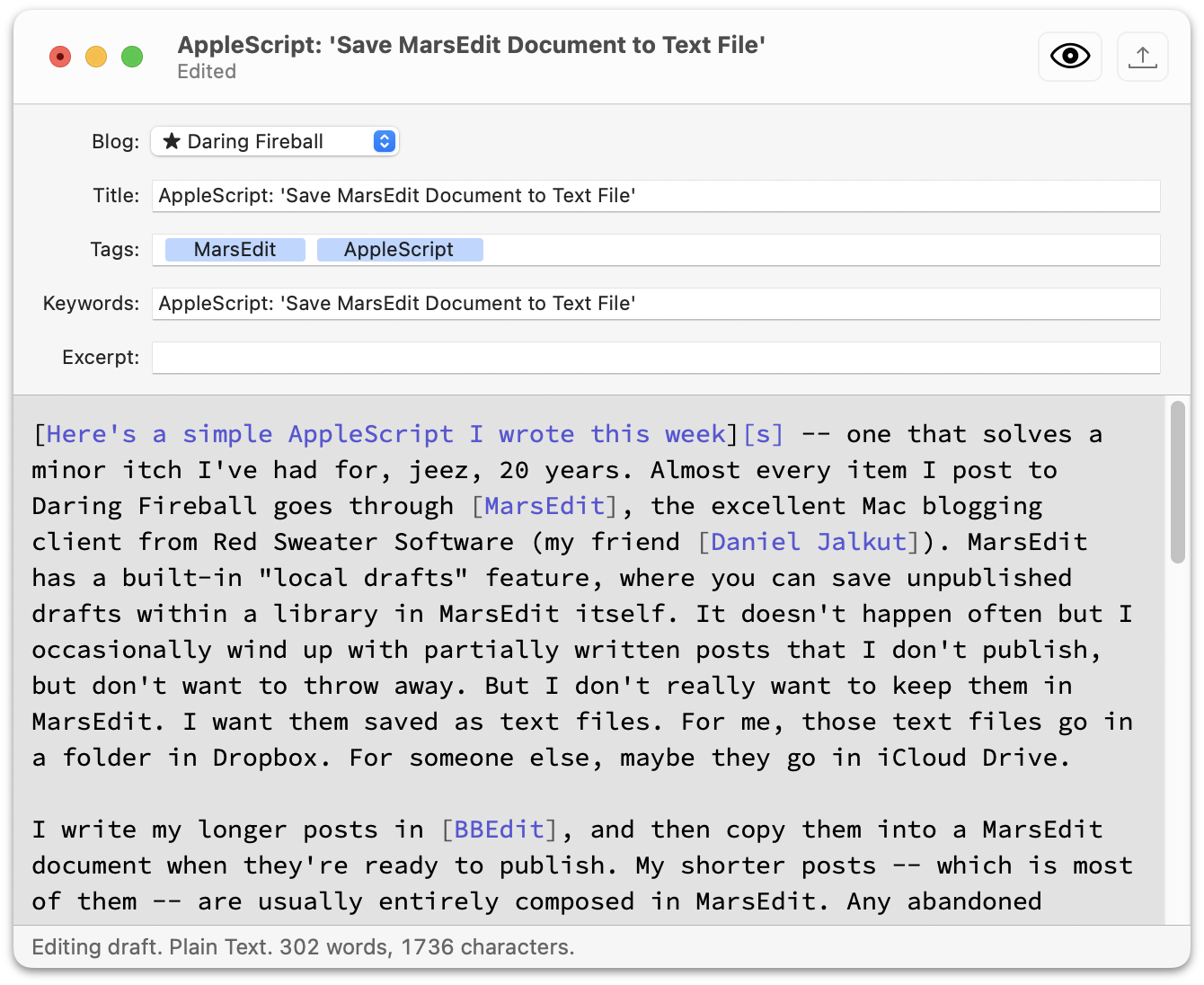
and then prompt you with a system Save dialog to enter a filename (defaulting to the Title field contents, if any, in the MarsEdit document) and location to save the text file. AppleScript even conveniently remembers the last place you saved a file, so it defaults to the same folder the next time you invoke it, without the script doing any work to remember that. The text file looks like this:
Title:  AppleScript: 'Save MarsEdit Document to Text File'
Blog:   ★ Daring Fireball
Edited: Thursday 19 March 2026 at 12:16:29 pm
Tags:   AppleScript, MarsEdit
Slug:   AppleScript: 'Save MarsEdit Document to Text File'
Excerpt:
---

[Here's a simple AppleScript I wrote this week][s] -- one that
solves a minor itch I've had for, jeez, 20 years. Almost every
item I post to Daring Fireball goes through [MarsEdit], the
excellent Mac blogging client from Red Sweater Software (my
friend [Daniel Jalkut]). ...
That’s it. If you use MarsEdit, maybe it’ll help you. I picked the document fields in MarsEdit that I use (Title, Tags, Excerpt, etc.). One potential point of confusion is that while MarsEdit has an optional document field named “Slug”, I don’t use it. For historical reasons, I use Movable Type’s “Keyword” field for the words I want to use for the URL slug for each post. So in my text files, where it says “Slug:”, the text after that label comes from MarsEdit’s Keywords field. And I keep MarsEdit’s actual Slug field hidden, because I don’t use a field with that name in Movable Type. Your mileage, as ever, may vary. But this makes total sense to me.
Anyway, this script helped me clean up 29 drafts, some of them years old, that had been sitting around in MarsEdit, bugging me. Now my “Local Drafts” library in MarsEdit is empty, and those drafts are safe and sound in text files in Dropbox. When something in your workflow is bugging you, you should figure out a way to address it. Why I didn’t write (and share) this script years ago is a mystery for the ages.
| Previous: | ‘Your Frustration Is the Product’ |